 重庆域名服务热线 :023-61066666 66887777 89082222 重庆域名服务热线 :023-61066666 66887777 89082222 |   |
| 重庆域名服务热线 :023-61066666 66887777 89082222 | |


 服务器RSA Hash信息变化导致SSH登录提示“Host key verification failed”错误的处理办法
发布日期:2016-1-14 20:1:8
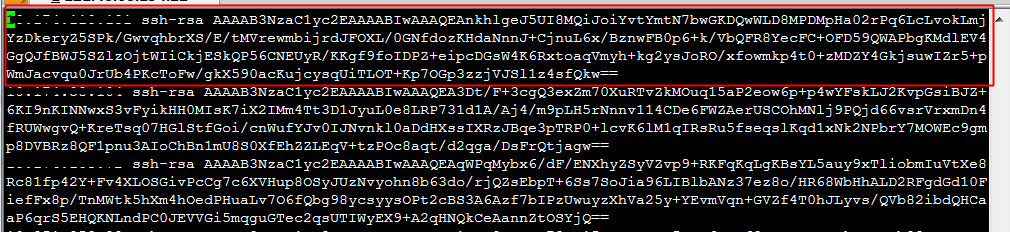
通过SSH连接ECS Linux服务器时,出现类似错误信息,导致无法正常远程登录,如下所示: @@@@@@@@@@@@@@@@@@@@@@@@@@@@@@@@@@@@@@@@@@@@@@@@@@@@@@@@@@@ @ WARNING: REMOTE HOST IDENTIFICATION HAS CHANGED! @ @@@@@@@@@@@@@@@@@@@@@@@@@@@@@@@@@@@@@@@@@@@@@@@@@@@@@@@@@@@ IT IS POSSIBLE THAT SOMEONE IS DOING SOMETHING NASTY! Someone could be eavesdropping on you right now (man-in-the-middle attack)! It is also possible that the RSA host key has just been changed. The fingerprint for the RSA key sent by the remote host is 23:00:20:83:de:02:95:f1:e3:34:be:57:3f:cf:2c:e7. Please contact your system administrator. Add correct host key in /root/.ssh/known_hosts to get rid of this message. Offending key in /root/.ssh/known_hosts:8 RSA host key for localhost has changed and you have requested strict checking.Host key verification failed. 这个问题通常是因为服务端信息变更,导致客户端本地SSH配置文件中的RSA HASH值失效。 解决办法: 1、使用如下指令编辑本地客户端SSH known_hosts配置文件: 温馨提示: 是对本地服务器如下文件做修改,而非服务器上的SSH配置文件 cp ~/.ssh/known_hosts ~/.ssh/known_hosts.bak vi ~/.ssh/known_hosts 2、如下图,删除访问异常的SSH服务器对应的HASH条目: 3、尝试重新使用SSH登录。
|



 业务QQ:
业务QQ:  联系电话: 023-61066666 66887777 89082222
 离线联系: 13452888882 13452888883 13452888886
  备案专线: 023-60887777 备案专员QQ:
 联系地址: 重庆市九龙坡区石桥铺一城精英国际40层17号 Copyright © 重庆典名科技有限公司 023dns.com All Rights Reserved