 重庆域名服务热线 :023-61066666 66887777 89082222 重庆域名服务热线 :023-61066666 66887777 89082222 |   |
| 重庆域名服务热线 :023-61066666 66887777 89082222 | |


 ECS Linux 服务器公钥秘钥SSH登录的设置步骤
发布日期:2016-1-14 19:1:5
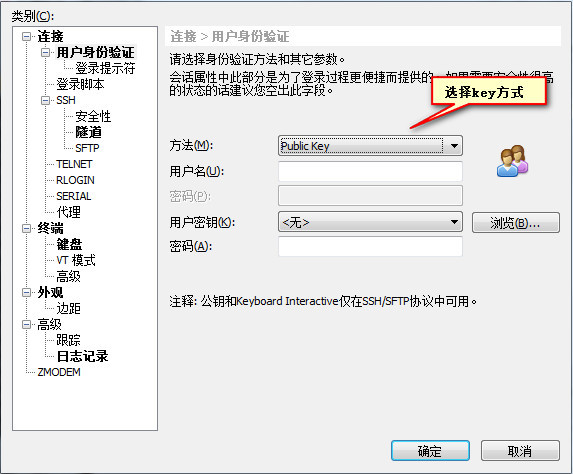
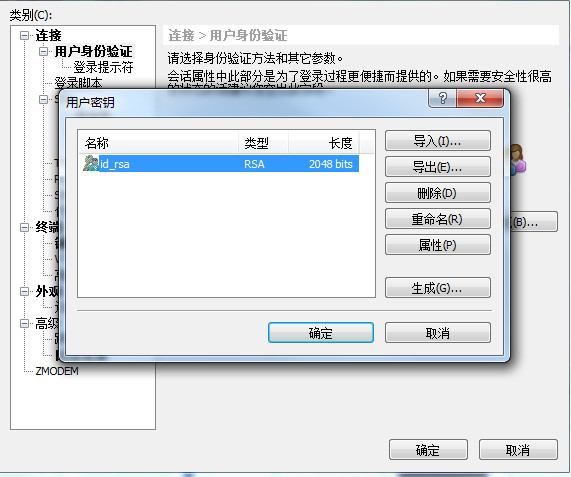
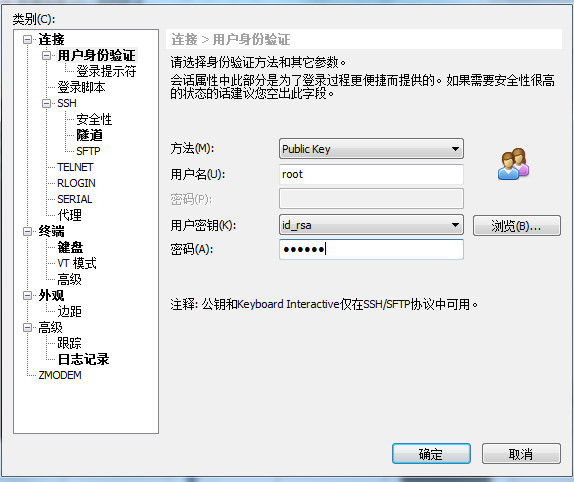
Ubuntu 14.04.1为例,设置步骤如下所示: 1、 生成密钥的公钥和私钥 # ssh-keygen -t rsa Generating public/private rsa key pair. Enter file in which to save the key (/root/.ssh/id_rsa): Created directory '/root/.ssh'. Enter passphrase (empty for no passphrase): #输入密码 Enter same passphrase again: #输入密码 Your identification has been saved in /root/.ssh/id_rsa. Your public key has been saved in /root/.ssh/id_rsa.pub. The key fingerprint is: 1c:37:a8:a3:65:a2:4a:89:ab:46:30:ad:54:d1:40:eb root@iZ28vo50eu5Z 2、将生成的私钥(id_rsa)下载到本地的windows机器上,并把公钥导入到.ssh/authorized_keys 文件中去 # cd /root/.ssh/ #cat id_rsa.pub > authorized_keys 3、设置sshd 服务器服务,打开以下设置: RSAAuthentication yes PubkeyAuthentication yes AuthorizedKeysFile /root/.ssh/authorized_keys 修改以下设置: ChallengeResponseAuthentication no PasswordAuthentication no UsePAM no 4、 重启ssh服务 #service ssh restart 5、导入私钥到远程工具中,比如xshell。 新建连接,点击左边用户身份验证:
|



 业务QQ:
业务QQ:  联系电话: 023-61066666 66887777 89082222
 离线联系: 13452888882 13452888883 13452888886
  备案专线: 023-60887777 备案专员QQ:
 联系地址: 重庆市九龙坡区石桥铺一城精英国际40层17号 Copyright © 重庆典名科技有限公司 023dns.com All Rights Reserved